Beginner’s Guide to Logitech Productivity Tools and Accessories
-
June 05 , 2026
-
38
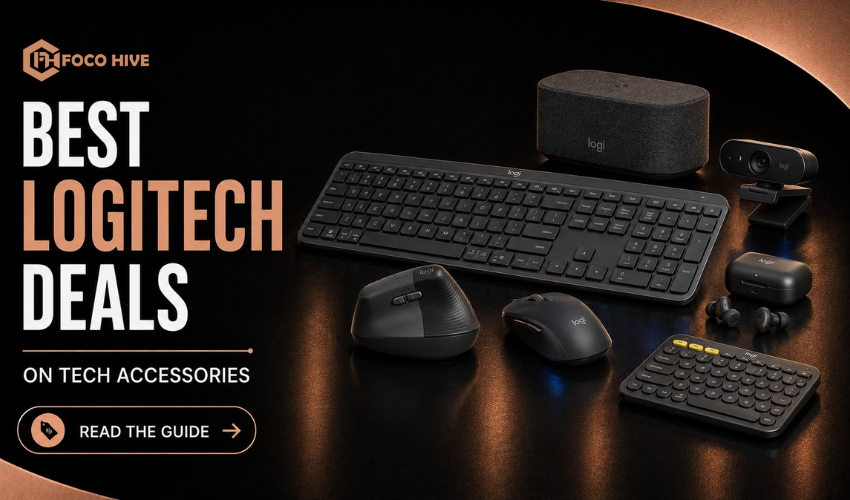
If you’re setting up a workspace for study, office work, or remote jobs, Logitech is one of the most reliable brands you can start with. Unlike gaming-focused brands, Logitech is built around comfort, simplicity, and long-term productivity. The challenge is that the product range is wide, and it’s easy to end up paying for features you don’t actually need. This guide helps you choose the right Logitech tools based on real daily use rather than specs or marketing.
Table of Contents
- Overview of Logitech Productivity Tools
- Key Product Categories
- Best Logitech Mice for Work
- Best Logitech Keyboards
- Webcams and Video Tools
- Headsets and Audio Accessories
- Multi-Device Workflow Features
- Budget vs Premium Setup
- How to Build a Simple Workspace
- Final Buying Tips
- FAQs
1. Why Choose Logitech for Productivity
Logitech focuses on building tools that are designed for long working hours rather than short gaming sessions. The main strengths include comfortable ergonomics, stable wireless connections and simple setup across different devices. This makes it especially popular among office workers, students, freelancers and remote professionals who need reliable equipment for daily use.
2. Key Product Categories
Logitech products are generally divided into a few core categories, including wireless mice, keyboards, webcams, and audio devices. Most of these tools are designed to work across multiple platforms like Windows, macOS, and tablets, making them flexible for different types of work environments. The real value comes from how smoothly these devices integrate into a single workflow.
3. Best Logitech Mice for Work
A good mouse can make long hours of work much easier by reducing strain and improving accuracy. One of the most popular choices is the Logitech MX Master 3S, which is designed for multitasking, smooth scrolling, and all-day comfort. It is especially useful for people who work with multiple windows or applications at the same time. For more budget-friendly setups, Logitech’s M-series mice offer a simple and reliable experience without extra features, making them ideal for basic office and study use.
4. Best Logitech Keyboards
Keyboards play a major role in productivity since they are used continuously throughout the day. The Logitech MX Keys S is one of the most refined options, offering quiet typing, stable wireless connectivity, and a comfortable layout designed for long sessions. It also supports multi-device switching, which is useful for users working across multiple systems. For budget users, Logitech’s K-series keyboards are a practical alternative, offering durability and simplicity without unnecessary extras.
5. Webcams and Video Tools
For online meetings, interviews, and remote classes, webcams have become essential. Logitech webcams are widely used because they deliver clear 1080p video quality, reliable performance in low-light conditions, and consistent audio support. This makes them a strong choice for professional communication.
6. Headsets and Audio Accessories
Logitech audio devices are designed mainly for voice clarity rather than entertainment-focused sound. This makes them ideal for meetings, online classes, and remote collaboration. The focus is on clear communication, noise reduction, and comfort during long calls rather than heavy bass or gaming-style sound profiles.
7. Multi-Device Workflow Features
One of the strongest advantages of Logitech is its multi-device functionality. Many Logitech mice and keyboards can switch between multiple devices instantly, allowing users to move between a laptop, desktop, or tablet without reconnecting hardware. This reduces desk clutter and makes multitasking significantly easier, especially for professionals working across different systems.
8. Budget vs Premium Setup
A basic Logitech setup usually includes a simple wireless mouse, a standard keyboard, and an entry-level webcam. This is ideal for students or light office users who only need essential functionality. A premium setup, on the other hand, includes devices like the MX Master mouse, MX Keys keyboard, and higher-quality video and audio tools. This setup is better suited for professionals who spend most of their day working on a computer and need maximum comfort and efficiency.
9. How to Build a Simple Workspace
A good productivity setup doesn’t need to be complicated. Most users can start with a comfortable mouse, a quiet keyboard, and a webcam for meetings if needed. The idea is to build slowly based on actual usage. Start with essentials, then upgrade only when your workflow requires more advanced features or better ergonomics.
10. Final Buying Tips
The best productivity setup is not the most expensive one it’s the one that fits your daily routine. Comfort should always come before extra features, and wireless devices usually help create a cleaner and more organized workspace. It’s also better to stick within one ecosystem so your devices work together smoothly without compatibility issues.
11. FAQs
1. Is Logitech a good productivity brand?
Yes, Logitech is known for comfort, reliability, and productivity-focused devices.
2. Is the Logitech MX Master 3S good for beginners?
Yes, it offers an ergonomic design and easy multitasking features.
3. Are Logitech keyboards good for typing?
Yes, they are comfortable for long typing sessions and support Windows and macOS.
4. Do Logitech devices work on multiple platforms?
Yes, they work with laptops, desktops, and tablets across different operating systems.
5. Is Logitech better for productivity than gaming brands?
Yes, Logitech focuses more on comfort and workflow efficiency.
Can I write you?
Sign up to get my weekly newsletter.